The VIVO Dual Vertically Stacked Ultrawide Monitor Desk Mount review comes down to one specific setup: two large screens arranged vertically, held from a desk clamp or grommet mount.
Its broad screen-size and weight limits are appealing, but desk thickness, VESA patterns, and each monitor’s weight still need a careful fit check.
VIVO STAND-V257R Review Summary
The quick verdict
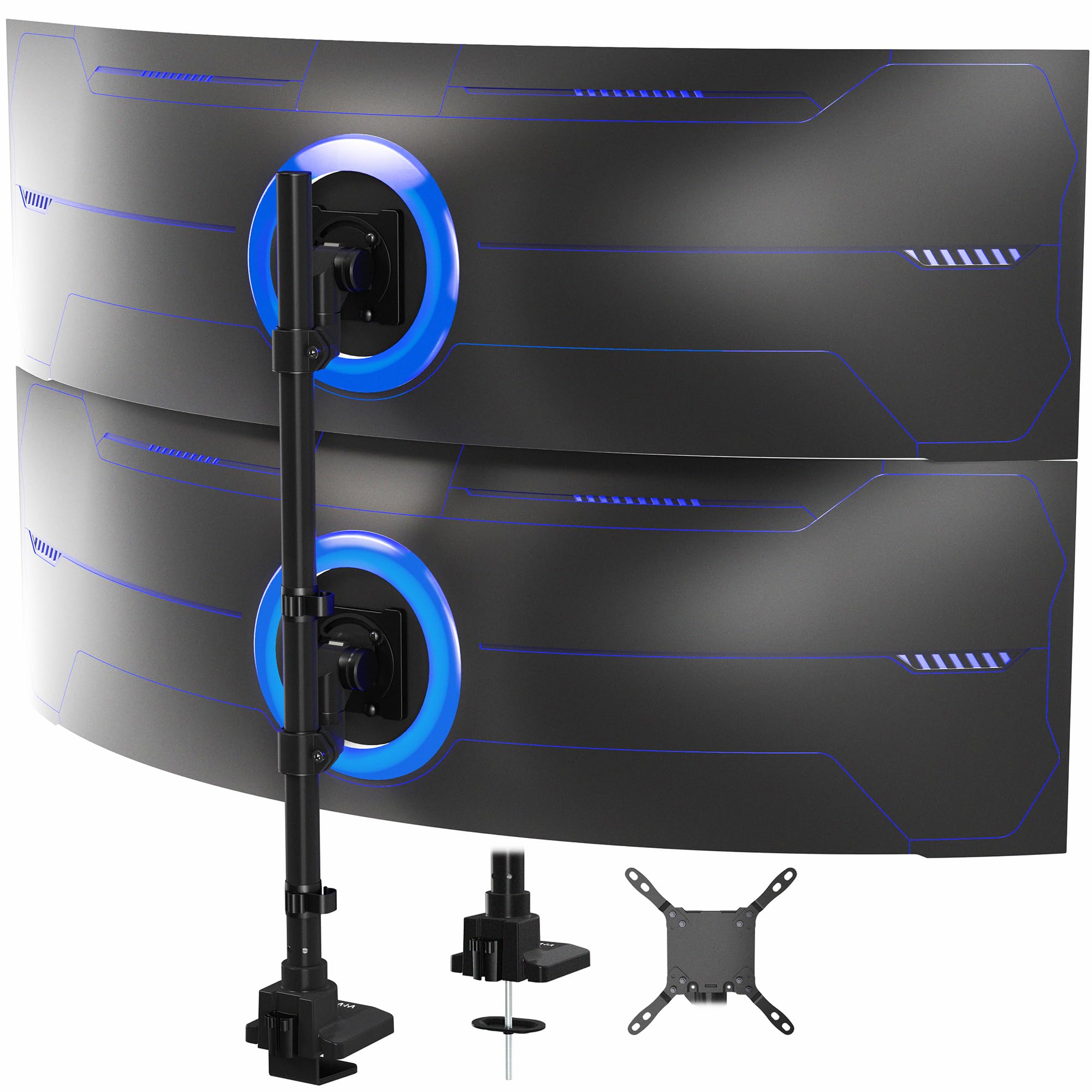
2,000+ ratings
Read Amazon ReviewsVIVO STAND-V257R Dual Ultrawide Monitor Mount
A heavy-duty desk mount for buyers who want two large ultrawide screens stacked vertically and can verify their desk and VESA fit.
- Designed to hold two ultrawide screens stacked vertically, each up to 57 inches.
- Maximum screen weight is up to 48.4 pounds per curved display or 59.4 pounds per flat display.
- Also compatible with TVs up to 43 inches.
- Adjustment includes +55° to -35° tilt, 132° swivel on the bottom arm, and 360° swivel on the top arm.

Pros
- Accommodates two exceptionally large ultrawide displays, with high listed weight limits.
- Offers separate adjustment ranges for the upper and lower screens, including full rotation on the top arm.
Consider before buying
- The clamp and grommet each have a maximum desk thickness, so some desktops will not fit either mounting method.
- The large screen capacity does not guarantee fit by size alone; buyers also need to check weight and VESA pattern for each monitor.
Read the full review summary
The STAND-V257R is designed for a demanding stacked display setup, supporting two ultrawide screens up to 57 inches.
Its capacity differs by screen shape: up to 48.4 pounds for each curved display or 59.4 pounds for each flat display.
Those generous limits make it a candidate for large-screen workstations where a typical dual arm may not fit the monitors. It also supports compatible TVs up to 43 inches.
The mount attaches to the desktop with a heavy-duty C-clamp on surfaces up to 1.45 inches thick, or an optional grommet mount on surfaces up to 1.26 inches thick.
Both screens use detachable VESA plates, and the center pole has cable clips. This suits buyers prepared to plan a fixed vertical layout and confirm monitor weight, VESA pattern, desk access, and screen clearance before assembly.
The buying factors
VIVO STAND-V257R Scorecard
Editorial scores reflect listed features and buyer fit; they are not laboratory measurements or customer ratings.
Large-screen capacity
Supports two ultrawide screens up to 57 inches, with separate weight limits for curved and flat displays.
Weight headroom
The listed per-screen limits are substantial, though buyers must distinguish curved from flat screens.
Positioning range
Tilt, swivel, rotation, and center-pole height adjustment provide useful ways to set the stacked viewing angles.
Mounting flexibility
C-clamp and grommet options accommodate different desk layouts, within relatively specific thickness limits.
VESA coverage
The mount supports five listed VESA patterns, including several larger layouts.
Cable organization
Clips along the center pole help guide power and AV cords, though the description does not specify a full cable-concealment system.
Key Features and Specifications of VIVO STAND-V257R
- Designed to hold two ultrawide screens stacked vertically, each up to 57 inches.
- Maximum screen weight is up to 48.4 pounds per curved display or 59.4 pounds per flat display.
- Also compatible with TVs up to 43 inches.
- Adjustment includes +55° to -35° tilt, 132° swivel on the bottom arm, and 360° swivel on the top arm.
- The lower arm rotates 180° and the top arm rotates 360°; height adjusts along the center pole.
- Desk attachment options include a heavy-duty C-clamp for surfaces up to 1.45 inches thick or an optional grommet mount for surfaces up to 1.26 inches thick.
- Detachable VESA plates support 75×75, 100×100, 200×100, 100×200, and 200×200 mm patterns; center-pole clips help manage cords.
Pros and Cons of VIVO STAND-V257R
Pros
- Accommodates two exceptionally large ultrawide displays, with high listed weight limits.
- Offers separate adjustment ranges for the upper and lower screens, including full rotation on the top arm.
- Includes both clamp and optional grommet mounting approaches.
- Detachable VESA plates can make attaching compatible displays more manageable.
- Center-pole cable clips provide a simple route for organizing power and AV cords.
Consider before buying
- The clamp and grommet each have a maximum desk thickness, so some desktops will not fit either mounting method.
- The large screen capacity does not guarantee fit by size alone; buyers also need to check weight and VESA pattern for each monitor.
- A vertically stacked layout is specialized and may not suit users who want side-by-side screens or frequent repositioning of both displays.
Who Should Buy VIVO STAND-V257R?
Good fit
Consider the VIVO STAND-V257R if your workstation calls for two ultrawides arranged one above the other and your displays fall within its size, weight, and VESA limits.
The upper arm’s 360° swivel and rotation, paired with center-pole height adjustment, give you several ways to orient the screens around that basic stacked arrangement.
Before ordering, check each monitor’s manual or rear label for its VESA hole pattern and weight.
Confirm whether each screen is flat or curved so you use the correct weight ceiling, then measure the desk at the intended mounting point.
Also make sure there is usable access for a C-clamp or grommet installation and enough vertical clearance for the screen positions you want.
The three-year warranty is a useful ownership detail, but the practical decision is compatibility: this mount is most compelling when the desk and both displays match its stated limits.
Plan the screen positions before tightening everything, since the arms’ motion ranges differ.
Who should skip it
Look elsewhere if you need a conventional side-by-side arrangement, a freestanding base, or a clamp or grommet that fits a desktop thicker than the mount’s listed limits.
This model is also a poor match if either screen exceeds the relevant size, weight, or VESA limits. Verify those details before choosing it, especially with curved ultrawides.
How the VIVO STAND-V257R Fits a Stacked Ultrawide Setup
Capacity depends on more than screen size
The headline support for screens up to 57 inches is only one part of compatibility. Each display must also stay within its applicable weight limit, and its VESA mounting pattern must match one of the five supported layouts.
Curved and flat screens have different listed weight ceilings, so identify both displays by type before deciding the mount has enough headroom.
A vertical layout has distinct adjustment zones
The lower and upper arms do not share identical movement: the lower arm swivels 132° and rotates 180°, while the top arm swivels and rotates 360°.
Tilt spans +55° to -35°, and height adjustment runs along the center pole. Together, these adjustments can help orient the panels within a stacked arrangement, but they do not change the basic vertical format.
Desk measurements determine the mounting route
The C-clamp accommodates surfaces up to 1.45 inches thick; the optional grommet mount accommodates up to 1.26 inches.
Measure where the mount will sit, not only at an easy-to-reach desk edge, and check the underside for access to the chosen attachment point.
If the desktop exceeds the applicable limit or the mounting area is obstructed, the stated mounting options may not suit that location.
VESA plates and cord clips ease setup planning
The detachable plates support patterns from 75×75 mm through several 200 mm layouts, which gives buyers a clear checklist for comparing the mount with each monitor. Center-pole clips can keep power and AV cords routed together.
Before assembly, identify cable lengths and the intended height of each screen so those connections can reach in the final arrangement.
Alternatives to VIVO STAND-V257R
Computer Monitor Arms alternative
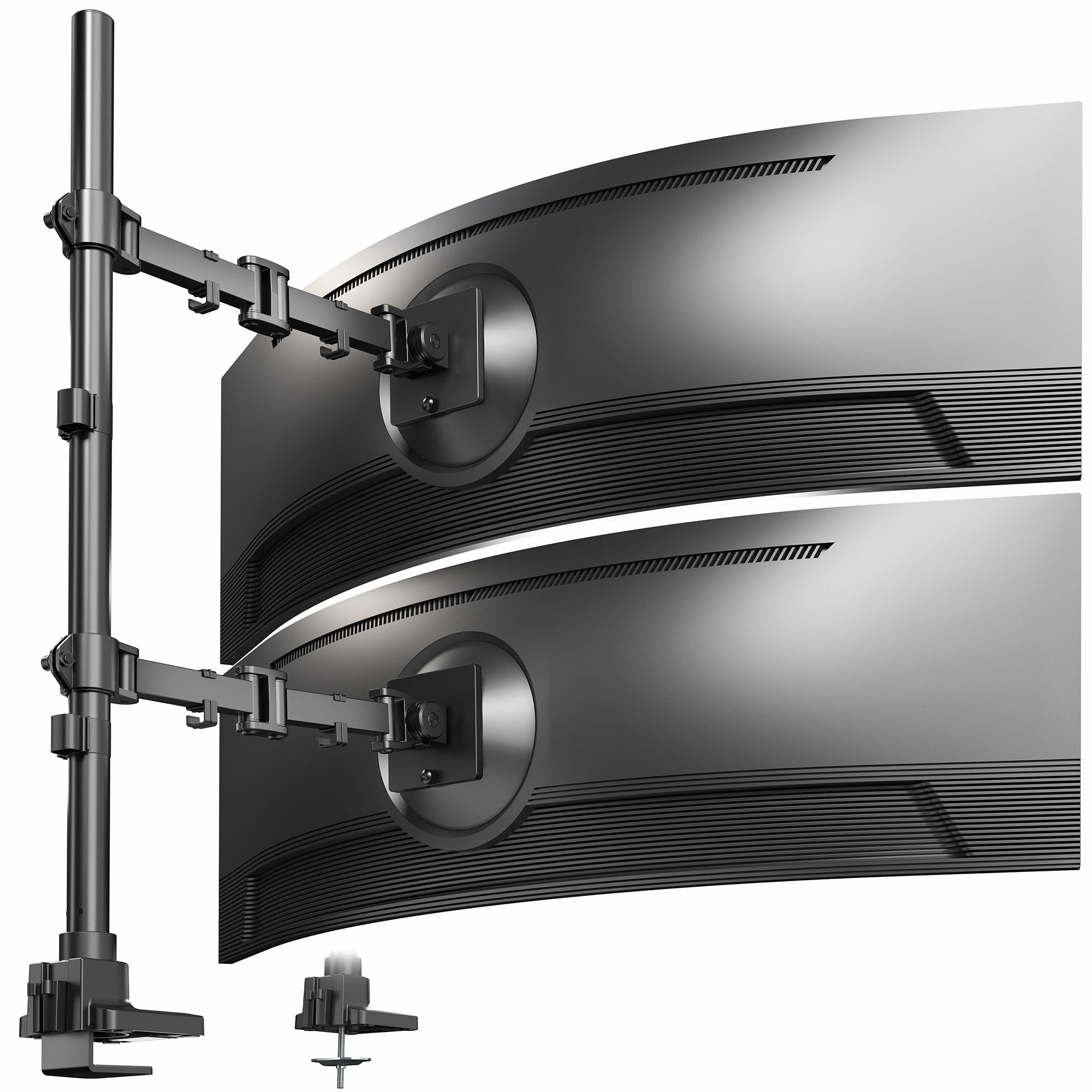
2,000+ ratings
Read Amazon ReviewsVIVO STAND-V120T Dual Ultrawide Monitor Extra Tall Desk Mount
Choose the STAND-V257R when its 57-inch ceiling and vertical stacked configuration match your displays.
Consider the STAND-V120T if screens up to 49 inches and 44 pounds each fit your needs and its listed movement range is a better match; confirm its VESA and desk thickness limits as well.
- The STAND-V120T supports two ultrawide screens up to 49 inches and 44 pounds each, with +85° to -25° tilt, 180° swivel, 360° rotation, and clamp or grommet mounting.
- The STAND-V257R is made for two vertically stacked ultrawides up to 57 inches, with separate high weight limits for curved and flat screens.
Computer Monitor Arms alternative
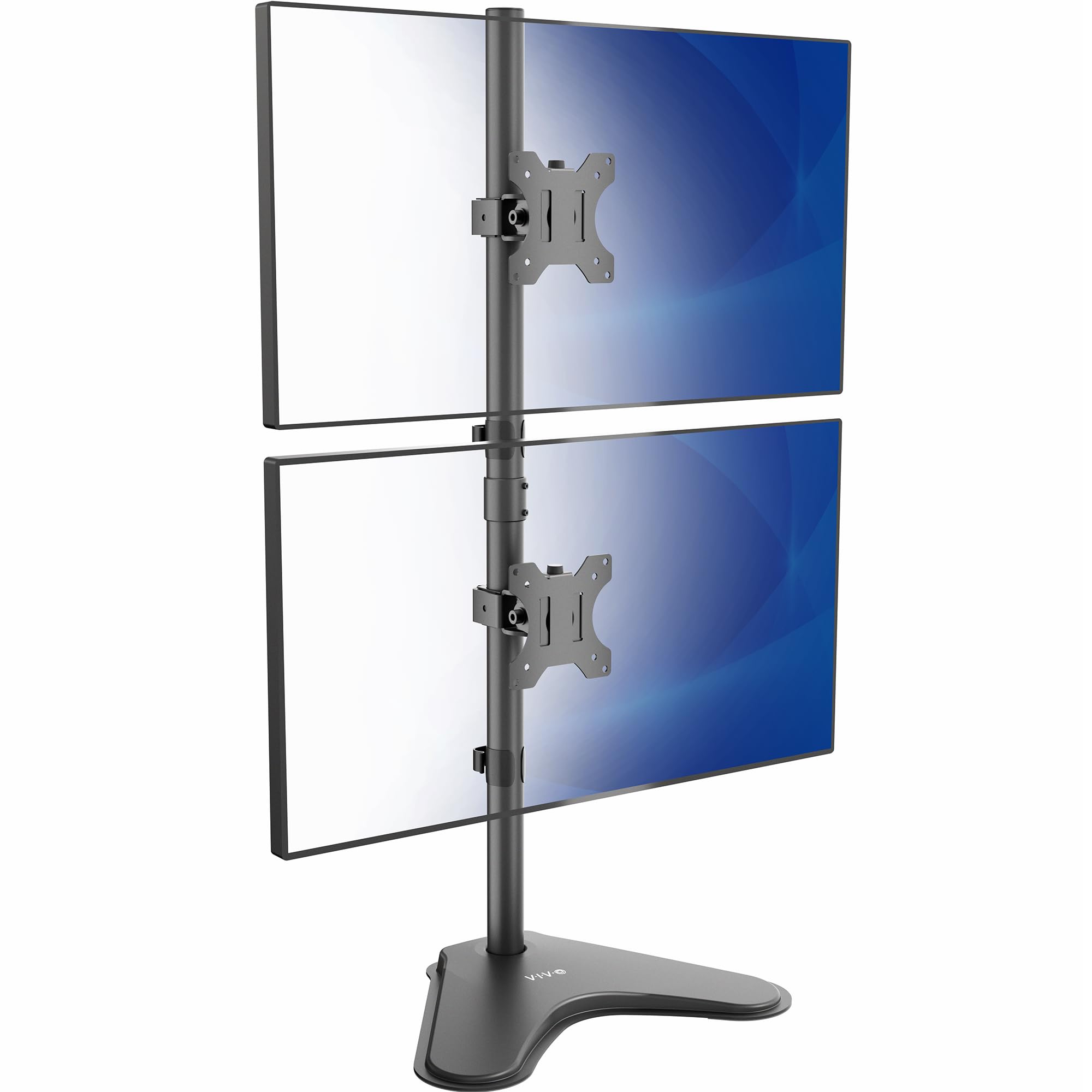
3,000+ ratings
Read Amazon ReviewsVIVO STAND-V002L Dual Ultrawide Monitor Stand
The STAND-V257R is the stronger fit for much larger or heavier displays and a desk-mounted installation. The STAND-V002L may suit smaller, lighter screens when a freestanding base is preferred; check that its base footprint fits your desk.
- The STAND-V002L is a freestanding vertical stand for two ultrawides up to 34 inches and 22 pounds each, with a 15.4-by-12.4-inch base and support for 75×75 or 100×100 mm VESA patterns.
- The STAND-V257R uses a desk attachment and supports two displays up to 57 inches, with weight capacity dependent on whether they are curved or flat.
Is VIVO STAND-V257R Worth It?
The VIVO STAND-V257R is worth considering when you specifically want two large ultrawides stacked vertically and both your displays and desktop fit its limits.
Its high stated weight capacity, separate arm adjustments, detachable VESA plates, and clamp or grommet options make it a focused solution for that setup.
Measure before buying: verify each monitor’s VESA pattern and weight, account for the curved-screen limit where relevant, and confirm desk thickness at the mounting point.
If those checks pass and a vertical layout suits your work, this mount has a strong feature set for building the arrangement.
Your review at a glance
2,000+ ratings
Read Amazon ReviewsVIVO STAND-V257R Dual Ultrawide Monitor Mount
A heavy-duty desk mount for buyers who want two large ultrawide screens stacked vertically and can verify their desk and VESA fit.
- Designed to hold two ultrawide screens stacked vertically, each up to 57 inches.
- Maximum screen weight is up to 48.4 pounds per curved display or 59.4 pounds per flat display.
- Also compatible with TVs up to 43 inches.
- Adjustment includes +55° to -35° tilt, 132° swivel on the bottom arm, and 360° swivel on the top arm.